Build a Lidar + AI Vision Robot Tank in Python
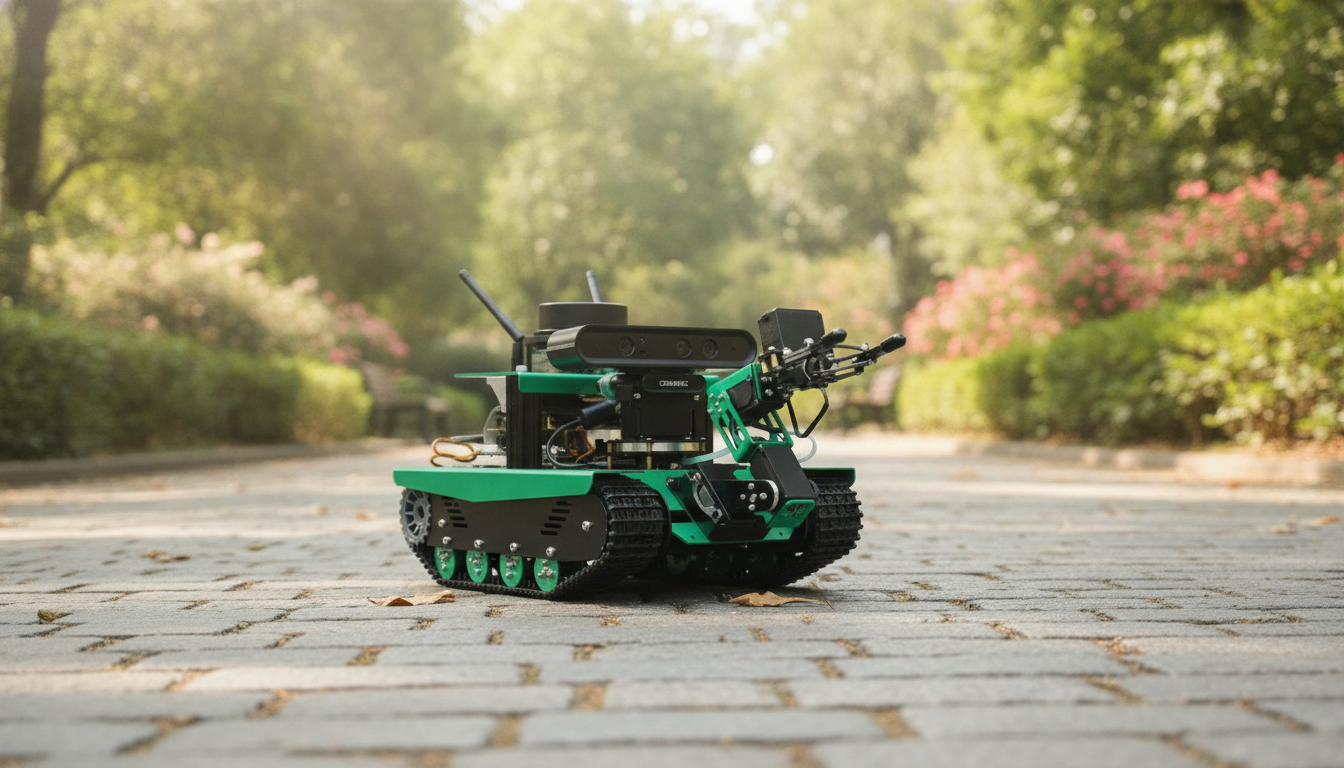
AI Vision Robot Tank Kit with Lidar & Python Programming
A tracked robot platform becomes far more than a remote-controlled toy when it can map rooms, recognize objects, and run repeatable experiments. This kit pairs lidar-based ranging with AI vision and Python-friendly software so learners can practice real robotics workflows—navigation, perception, and control—on a compact tank chassis that handles uneven floors and classroom obstacles.
What This Robot Tank Kit Is Built For
- Hands-on robotics learning with a platform that supports perception (camera) and ranging (lidar) together.
- Programming workflows centered on Python for quick iteration on motion, sensing, and autonomy behaviors.
- Education and prototyping use cases: indoor mapping demos, obstacle avoidance labs, and vision-based tracking exercises.
- Tracked tank chassis advantages: stable traction, easier turning in place, better performance on rugs and thresholds than many wheeled kits.
Core Components and How They Work Together
This class of robot kit shines when its parts are treated as one system: sensors feed a control loop, the control loop outputs motor commands, and repeated tests refine the behavior.
Lidar module
Lidar provides distance measurements and scanning that can be used for obstacle detection and the early building blocks of mapping. In practice, lidar readings often become “if/then” safety rules first (slow down, stop, turn), then evolve into more structured navigation.
AI vision camera pipeline
The camera adds the “what” to lidar’s “how far.” Depending on the software stack, vision can be used for object recognition, line tracking, marker detection, or target following. When lighting and targets are consistent, camera-based triggers are a reliable way to teach perception-to-action robotics.
Onboard compute/controller and Python APIs
The controller layer bridges sensors to motor control and exposes APIs for Python scripts. That makes it straightforward to prototype: read a sensor stream, make a decision, and set left/right track speeds. For deeper learning, popular ecosystems like ROS can structure topics such as messaging, nodes, and modular autonomy.
Motor driver + tracked drivetrain
A differential tracked drivetrain controls motion by varying left and right track speeds. That means precise rotation-in-place, predictable arc turns, and stable traction on common indoor surfaces like carpet, mats, and threshold transitions.
Power and expansion considerations
Battery capacity affects run time most noticeably during compute-heavy vision tasks. For future iterations, optional expansion paths often include add-on sensors, improved lighting for more consistent camera results, or even a robot arm attachment for manipulation demos.
Specs and Capabilities at a Glance
A quick comparison view helps plan lessons and projects: what the kit senses, how it moves, and what learners can build first. Use this list to align projects with the environment (small room vs. hallway) and expected autonomy level (manual teleop vs. mapping).
| Area | Included Capability | What It Enables | Typical First Project |
|---|---|---|---|
| Mobility | Tracked tank chassis (differential steering) | Stable movement over varied indoor surfaces; tight turning radius | Drive forward/turn routines with speed control |
| Ranging | Lidar distance scanning | Obstacle detection; space awareness; mapping foundations | Stop-and-go obstacle avoidance |
| Vision | AI camera pipeline | Object/marker tracking; line following; visual triggers for behaviors | Color/shape-based target following |
| Programming | Python-friendly development | Rapid prototyping of behaviors; easy debugging and iteration | Keyboard teleop + sensor readouts |
| Autonomy | Sensor fusion potential (vision + lidar) | More robust navigation decisions than single-sensor control | Choose path when obstacle blocks the goal |
Project Paths: From First Drive to Mapping and Tracking
- Beginner: teleoperation scripts (keyboard/gamepad) plus live sensor readouts to learn the control loop.
- Intermediate: reactive obstacle avoidance using lidar thresholds and timed turns.
- Intermediate: line following or marker detection using the camera feed and simple vision rules (often built with OpenCV).
- Advanced: fuse lidar + vision cues to reduce false positives (for example, use vision to confirm the target while lidar enforces a safe stopping distance).
- Advanced: build a room “tour” routine—waypoints, turn angles, and safety stops—then refine with sensor feedback.
- Capstone: navigation demo in a cluttered space with a defined goal and safe fallback behavior (stop, reverse, re-scan, retry).
Python Programming Workflow and Skill Builder Checklist
A repeatable workflow keeps robotics projects from turning into “it worked once” demos. Python is a strong fit because it supports fast iteration, readable logic, and easy tooling (see the official Python documentation for language and standard library references).
- Set up a repeatable development flow: install required dependencies, confirm sensor streams, then validate motor commands.
- Start with small, testable functions: read_lidar(), get_frame(), set_speed(left,right), emergency_stop().
- Use logging and plotting for lidar distances or detected object confidence to teach debugging beyond “it moves/it doesn’t.”
- Add safety and reliability patterns: timeouts, watchdog stop, and speed limits during early experiments.
- Encourage version control for classroom/lab use to track changes across milestones.
Indoor Navigation Tips for More Reliable Demos
Who This Kit Fits Best
Product Page
Pricing, availability, and the latest listing details are available here: AI Vision Robot Tank Kit with Lidar & Python Programming.
For a different kind of autonomy-in-the-home reference point, compare it with: Smart Home Robot Vacuum Cleaner with Mop & Automatic Dust Collection.
FAQ
Does lidar replace the camera for navigation?
No—lidar and a camera solve different parts of navigation. Lidar is excellent for distance and obstacle geometry, while the camera provides semantic cues like markers, lines, or specific targets; combining both tends to be more robust than relying on a single sensor.
Is Python enough to build autonomous behaviors on this platform?
Yes, Python is widely used for robotics scripting and rapid iteration. The quality of autonomy depends on sensor processing, control loop design, and careful testing in the intended environment.
What’s a good first project to validate everything works?
Start with teleop driving, then add a live lidar distance readout with a simple stop threshold, and finish with basic vision tracking using a high-contrast target. That staged approach verifies motors, ranging, and vision before moving into more complex autonomy.













Leave a comment