Bi-Color + RGB LED Kit: Better Lighting for Photo & Video
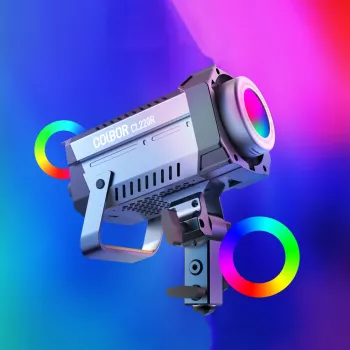
Adjustable Bi-Color RGB LED Photography Lighting Kit for Photo, Video, and Streaming
Consistent lighting is the fastest way to improve image quality, whether shooting product photos, portraits, or content for social media. An adjustable bi-color RGB LED lighting kit makes it easier to match ambient light, shape flattering skin tones, and add creative color effects—without changing locations or chasing daylight.
What This Lighting Kit Helps You Do
- Switch between clean white light and warm tones to match room lighting or golden-hour looks
- Use RGB color modes for accents, background washes, and stylized scenes
- Control brightness for exposure without pushing ISO or introducing noise
- Create repeatable setups for product photography, interviews, livestreams, and reels
Bi-Color vs RGB: When Each Mode Matters
Bi-color and RGB aren’t competing features—they’re complementary tools. Bi-color control (warm-to-cool white light) keeps your footage and photos looking natural, while RGB lets you art-direct the mood.
- Bi-color (warm-to-cool) is ideal for accurate skin tones and matching mixed lighting in homes and studios
- RGB is best for creative scenes, separation between subject and background, and mood-driven storytelling
- For product shots, bi-color typically delivers more consistent color reproduction; RGB is useful for themed campaigns
- For video, combining neutral key light (bi-color) with a subtle RGB rim or background light adds depth
Quick guide to choosing a lighting mode
| Goal | Best Mode | Setup Tip |
|---|---|---|
| Natural-looking portraits | Bi-Color | Match the room’s existing light temperature; keep shadows soft with diffusion |
| Clean product photos | Bi-Color | Use a neutral tone and consistent brightness; avoid colored reflections |
| Cinematic background color | RGB | Aim color light at the background, not directly at skin, for a cleaner look |
| Streaming with visual style | Bi-Color + RGB | Use bi-color as key; add RGB as backlight or practical accent |
Key Features to Look For in an Adjustable LED Kit
Small differences in lighting gear can create big differences on camera, especially when you need repeatable results. A strong kit should help you move fast while keeping color and exposure under control.
- Wide color temperature range for smooth warm-to-cool transitions
- High brightness with fine dimming steps for precise exposure control
- Accurate color rendering for truer skin tones and product colors (look for strong CRI/TLCI claims)
- Multiple effects/modes for fast scene changes during content creation
- Simple controls (on-device, remote, or app) for quick adjustments mid-shoot
- Stable stands and secure mounting so angles stay locked during long sessions
Color accuracy matters more than most people expect. If a light renders colors poorly, skin can look flat and product tones can shift—especially noticeable on branded packaging. For a quick primer on color metrics, see the CIE’s overview of Color Rendering Index (CRI).
Practical Setups That Work in Small Rooms
You don’t need a large studio to get professional-looking results. The goal is to control direction, softness, and consistency, then lock it in so each shoot matches the last.
- Portrait key light: place the main light 30–45° from the camera and slightly above eye level for flattering shadows
- Two-light interview: use one light as key and the second as a dimmer fill to control contrast
- Background separation: add a low-power RGB accent behind the subject to create depth without over-coloring skin
- Product tabletop: keep the light large/soft with diffusion, and use white foam board as a budget reflector
- Avoid mixed color casts: turn off overhead bulbs or match their color temperature with the kit
When mixing room lamps with LED panels, a quick white-balance check prevents the “orange face, blue shadows” look. Adobe’s guide to understanding white balance is a helpful reference when dialing in consistent color across sessions.
How to Dial In Color and Exposure
Lighting gets you most of the way there, but the last 10% comes from intentional settings. A consistent workflow keeps your edits lighter and your content more uniform across platforms.
If exposure starts to feel confusing, it helps to revisit the relationship between ISO, shutter speed, and aperture. Nikon’s explainer on understanding exposure breaks it down clearly for photo and video.
Care, Storage, and Long-Session Tips
Product Option
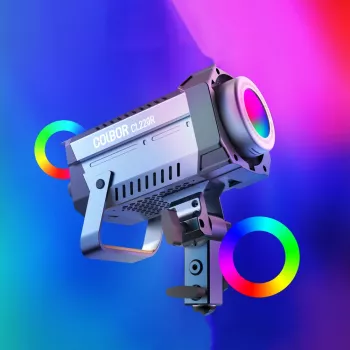
Adjustable Bi-Color RGB LED Photography Lighting Kit: designed for flexible white balance control plus creative RGB looks in a single setup. Best suited for creators who need one kit that can cover clean commercial lighting and stylized scenes.
More In-Stock Picks to Upgrade Your Space
- Smart Home Robot Vacuum Cleaner with Mop & Automatic Dust Collection (helps keep a small studio clean—less dust on backdrops, props, and shelves)
- Multi-Function Electric Waffle & Hot Pot Cooker with Steamer (a handy option for long shoot days when you want quick, at-home meals between takes)
FAQ
Is RGB lighting good for portraits, or should it be avoided?
RGB can work well as a background or rim accent. For natural skin tones, keep the key light in a neutral bi-color setting and use RGB subtly to avoid unnatural casts.
How far should an LED light be from the subject?
Start around 2–5 feet depending on brightness and modifier size. Move closer for softer light at lower power, and farther away for harder shadows and broader coverage.
What color temperature is best for indoor video?
Match the room lighting (often 2700–3200K for warm bulbs or around 5000–5600K for daylight-balanced spaces). Set your camera white balance to match so tones stay consistent from clip to clip.








Leave a comment